Monday, January 4, 2016

5 Marketing Processes You Should Seriously Consider Automating

Marketing technology is moving at a rapid pace that is enabling businesses to reach more potential customers and better engage existing ones. So, if you are still stuck with excel sheets and manual outreach processes, it’s time to reexamine how you can bring in the much required marketing efficiency to your business.

Automation doesn’t necessarily have to be an advanced AI capable of solving complex riddles, predicting and magically running your show. Nor does it mean that you should be able to automate the complete chain of activities in a process. Using marketing technology to reduce manual effort and intervention itself can save a ton of time and improve conversions.

WSJ published a great article recently on how companies are using automation (paywall) to boost their marketing efforts and reach their customers better. The author describes marketing automation as an ever-expanding area with a big focus currently on automating activities such as website and content management, email marketing, customer segmentation, lead filtering, digital advertising and social media marketing.

While digital has opened up a ton of opportunities for marketers, the increasing amount of noise and activity online makes it really tough to be heard and seen. For a business, this means two things:

  • Every lead is precious and worth fighting for
  • The marketing effort required today is several times higher than it was 10 years ago

Deploying marketing automation is just as important for SMBs as it is for large companies to have a competitive edge. You can identify activities for automation by looking for repetitive tasks that are backed by some data or specific logic. Often such activities involve simple decision-making or are rules-based.

Below are five examples of marketing processes where automation can bring immense benefits. You can automate parts of these processes by using off-the-shelf solutions or building some small tech in-house. The decision of choosing one over another should be based on cost-effort-time analysis.

1. Lead tracking and nurturing

Like I said before, the battle today is open for every lead. However, it is impossible and probably stupid to nurture leads through manual processes. Whether you are working with 50-100 leads a month or several thousands, a CRM is must in your marketing technology arsenal.

Most CRMs offer automatic lead capturing from contact forms. There are several cloud based CRM SaaS providers, and some even offer access for single user for free. And if you are a SaaS company, most likely your CRM would be heavily integrated within your product.

Salesforce is the big daddy of the CRM software world, and while a bit pricey, it offers valuable integrations with key software products you are likely to use now or in future like Pardot, Hubspot, ExactTarget and Marketo. Salesforce also allows for a lot of flexibility to configure, but its user interface is not one of the friendliest to work with.

Other popular CRM solutions include Close.io, Pipedrive, AgileCRM and Zoho – all of these are modern and easy to get started with.

Close.io has a clean interface, and is great for logging email and call interactions, bulk emailing, calendar integrations and reporting.

Zoho does most of this and is cheaper, maybe not as elegant.

Pipedrive is a good low cost basic CRM.

AgileCRM is interesting and goes beyond regular lead tracking and management. It has a bunch of marketing automation features, which SaaS companies will find useful. These include user onboarding with rule-based emailing, in-app messages and guided tours, social media monitoring, and web engagement tools.

Getting the data in order is just the beginning. Using this data to drive conversions is the big battle. This starts with mapping your sales cycle, identifying the various touch-points and opportunities for follow–ups, and then automating the follow-ups themselves or the reminders for the personal ones (depending on the kind of business you run).

In a typical SaaS scenario, you generally have 30 days or less to get a user engaged and convert. A series of well-planned emails, sent on an automated schedule during the period, based on the user activity pattern can improve conversions significantly. It also allows you to create the much needed touch points for user interaction, early problem resolutions and feedback.

While setting up the email follow up plan, be sure to customize it to the existing engagement of the user with the product, using the activity data of the account. For example, if the user account has not registered any trigger activity, following up with a demo suggestion is a great idea. But if the user is already primed and active, sending in a congratulatory note praising the activity might be more in order.

While it is always possible to set up such rule based email campaigns on your own, considering the option of using one of the many email marketing automation solutions is always worthy of exploration.

Some popular email marketing automation software:

  1. Customer.io – It is a smart app for sending your customers email messages at just the ‘right’ times. You can set up simple day based email schedules or activity-based emails. Also supports A/B testing and conversion tracking.
  2. Drip – It’s a simple tool for creating drip campaigns. Drip offers blueprints or pre-set drip campaigns, which can be customized to your case. The app can pull emails from your website and other sources.
  3. Sendloop – This app gets closely integrated with your website, monitoring user activity, allowing you to create personalized drip email campaigns.
  4. Pardot – This is the best choice if you’re using Salesforce as your CRM. They integrate together seamlessly (Salesforce owns Pardot). Set up marketing emails and drip campaigns easily. All the data is shared with your Salesforce account.

Marketing automation tools and email marketing apps:

  1. Marketing automation tools – AgileCRM, Hubspot and Infusionsoft – These are more multi-purpose software, which gives them a unique edge, as they are powered with more data about your users or customers. AgileCRM lets you create visual flows of the rules to send your messages. Infusionsoft also allows you to create rules-based visual maps of interactions including emails. Hubspot is powered with a lot of web analytics, which is great assistance creating targeted email campaigns.
  2. Newsletter and email marketing apps – MailChimp and Campaign Monitor – These are more traditional email marketing tools, popular for sending newsletters. Mailchimp gives you some powerful email marketing automation options by giving you access to data such as who opened emails and clicked links. Campaign monitor can be armed with personal customer data such as birthdays, anniversary to personalize email content to engage better.

2. Social media marketing

Social is a busy business – engaging thousands of fans and followers is no easy task. There are 3 critical components of social media engagement and marketing:

  1. Posting content on social accounts
  2. Conversations on social
  3. Community building

Of these, no. 2 should never be automated. However, the other two do have a reasonable scope of automation, and between them, content more than the community.

Posting on social every couple of hours is a good idea, as the content is so fast moving that if you are not there every few hours, your account will have very poor visibility. To create this amount of content real time and posting can be extremely time and effort intensive. This is why you’ll need something like Buffer, which makes it easy to schedule posts and send them out on customized times. All social media platforms are included, as well as some analytics to tell you the engagement each post/tweet receives.

I think the real big win comes from partially automating your content generation process. As it’s expensive and very difficult to generate this volume of new content, curating thought leadership stories for your social accounts is a great alternative. Most businesses rely heavily on sharing content from sources other than their own web properties.

Community building is largely difficult to automate, and should ideally be driven by effort from real people. I’m personally strongly against automated direct messages, likes and retweets – these go against all principles of social media and are also against the policies of social platforms. However, if you use a tool to find people who’d be interested in your social accounts and follow them – that’s a perfectly okay partial-automation boost.

Social media automation has been a topic of much debate, but as long as the basic principles of social media are respected, technology can bring in the much-needed efficiency to reach out in the crowded space.

3. Content marketing

For the most part, content marketing is a tough one to automate. But time consuming activities like content research and idea generation can be technology enabled. Similar to the use of content curation tools for social media, the same apps can be used to monitor the trending content thematically, getting a personalized content feed for idea generation, research or curation.

Having been in the content industry for over 6 years now, I have seen content creators spend close to 30% of their time in these activities. Even partial content research automation can save hours of energy spent Googling for relevant stories or material. The trick to partially automating content research is to use tools to track your industry news and trends – basically let some cool technology do the content discovery and filtering for you. Below are some handy apps you can use:

  1. Feedly – Feedly took off with the shuttering down of Google Reader, as a popular alternative to reading RSS feeds. Today Feedly boasts of an impressive collection of blog and publications feeds, which can be subscribed to create your own custom news and trends feed. It’s a handy app to stay abreast of the latest in industry, research by broad keywords and generate ideas for your content pieces.
  2. Buzzsumo– Buzzsumo is a great tool for finding the most socially trending content in your space. It’s great for content idea generation, research and finding influencers to involve in your content marketing efforts.
  3. Google Alerts – Google Alerts is a simple, basic tool to get email alerts on recent content published with some keywords mentioned. It’s different and cleaner in output from the Google search, which makes it high utility. Great for tracking content trends and idea generation.
  4. Storify – Storify is a great tool to curate content for your blog posts. You can search content by keywords and use the app’s editor to draft your post. For your occasional curated posts, it is plenty useful.

You can also use some free tools to help discover what your target audience wants to read.

Similarly, a lot of energy is spent in planning and coordinating content generation and publishing. As content marketing involves multiple process stakeholders (freelance and in-house content creators, content managers, graphic designers and sometimes more), a project management platform is in order. There are project management platforms solely dedicated to managing content marketing efforts, but the popular multi-purpose project management platforms do the job as well. Not using any workflow automation can easily create a lot of process and communication redundancy, and even lead your content marketing efforts astray.

Good multi-purpose project management platforms include Asana, Trello, Basecamp and Teamwork. I particularly like Asana – it has a neat interface that makes tracking tasks and team conversations a breeze.

4. User onboarding, engagement, cross- and up-sell

Converting a user is half the battle won. Retaining the user, ensuring that she stays engaged and finding opportunities for expanding the relationship are the next big and important challenges. The good news is much of this can be managed by smart automation backed by data.

Onboarding a user is a critical part of SaaS sales. It starts when a user creates an account.

A well-crafted automated email campaign for the defined conversion cycle is required. It should start with a welcome note and then lead into emails/in-product messages about usage-prompts (based on the user activity), offering of support and resources, and a few reminders about paid plans and trial periods nearing end (if the case be). Once the user converts to a paid plan, continuing to lend a helping hand with resources, tips and gentle notification nudges to encourage activity, can go a long way in ensuring user retention. Khuram Hussain of Fileboard has written a step-by-step on how to follow up with leads.

Intercom.io also has a great blog post on several good examples of converting emails.

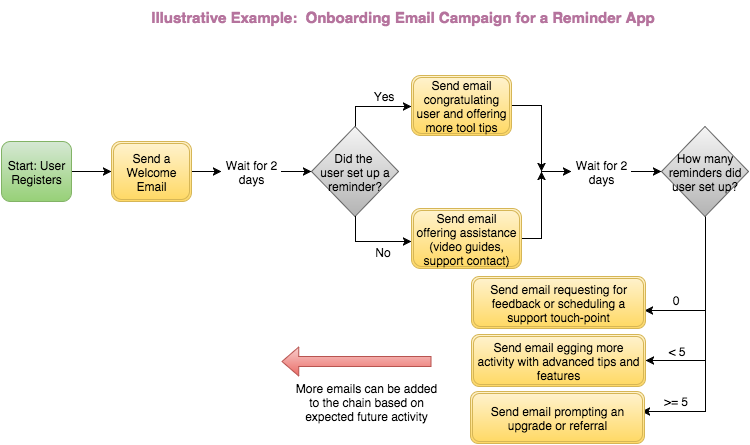
Smart use of data is the building block of awesome marketing. Segmenting users by activity data and classifying them in buckets will allow you to create personalized automated marketing campaigns for cross and up-sell. For example, your most engaged SaaS users can get prompts for discounted upgrades or add-ons, while relatively low activity users can get emails about tips to better use the software or cross-sell of the add-ons that can bring more value.

For e-commerce, previous e-commerce purchase history can be used for selective product cross-sell (complementary products) or up-sell (better/newer versions of what customer previously purchased).

Below is an illustrative example (simplified) of an email campaign based on customer segmentation:
email-campaign-segmentation

5. Website/App operation and optimization

Your web and mobile interfaces are your most important marketing assets, and offer many opportunities of improving conversions and capturing users. Well-placed and timely prompts to engage users can be very valuable on these assets. Several off-the shelf solutions are available to A/B test and implement changes. Similarly, several marketing tech solutions are also offered to measure performance and recommend changes for search engine optimization or on-site or app user engagement.

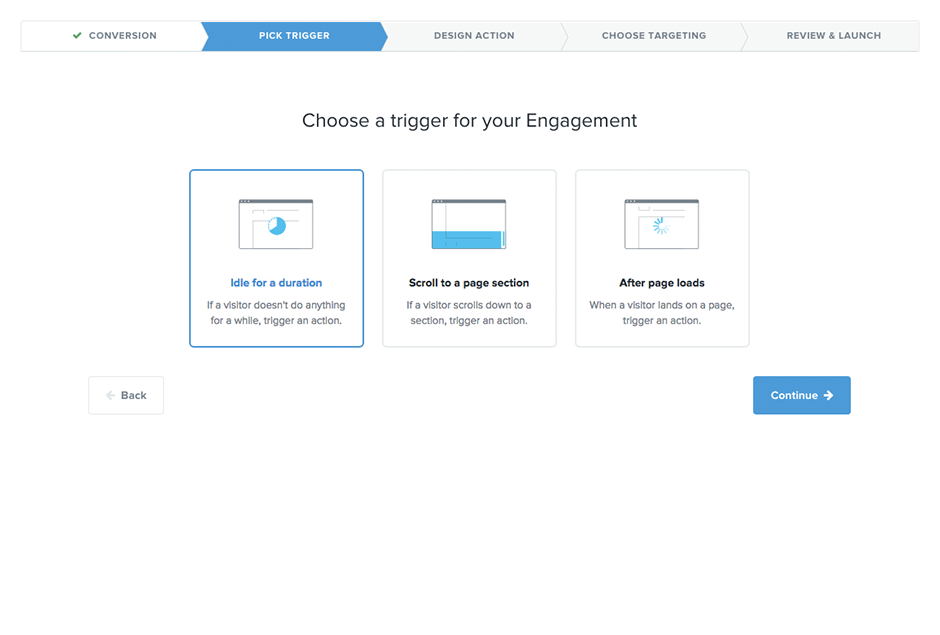
Automation solutions that track visitor or user activity real-time and present timely prompts to take desired actions can significantly improve conversions. When configuring such tech for your app or site, it is important to make sure you don’t over-do the prompts and that they are thoughtful to bring about desired results. Too many disruptions in a user’s experience with your product will irk the user to moving away from it. Tools like Kissmetrics, Intercom.io, SumoMe and Hubspot can be very handy in achieving such high quality user interactions.

Kissmetrics Engage
kissmetrics-engage-flow

E-commerce businesses can especially benefit a lot from marketing tech that allows them to assess real-time user behavior and allows them to give smart recommendations to convert a sale. Cart abandonments also should trigger timely reminders or feedback requests, both of which can be very valuable.

Conclusion

Marketing technology offers a lot of opportunities for bringing in new customers and doing more business with existing ones. Large companies are using it on a big scale to drive more efficiency in their marketing processes, and better engage with their customers. But marketing automation is not just the dominion of large businesses, smaller businesses need it just as much to drive down marketing costs and convert more to have a competitive edge.

Automation doesn’t necessarily mean complex systems running large processes on big data. Even smaller hits with partial process automations can bring in significant wins. What’s most important is structured thinking about marketing processes to identify areas of opportunities and implementing automated systems to run the show for you.

About the Author: Sophia Solanki is a co-founder of DrumUp, a social media and content marketing automation app and Godot Media, a content services firm. She has over a decade of experience in content and social media marketing, entrepreneurship and business consulting. Sophia is an ardent supporter of technology to improve efficiency in all aspects of life and business. You can also follower her on Twitter @sophiasolanki.

Marketing Day: TurboTax Super Bowl 50 Ad, Tag Management & Mobile Marketing

Here's our recap of what happened in online marketing today, as reported on Marketing Land and other places across the web.

Please visit Marketing Land for the full article.

Generate Leads from LinkedIn Through 6 Simple Steps

linkedin

Everywhere you look, you see articles about social media tactics you can use to get more traffic or leads for your business.

And while tactics can be useful, you need to combine them in a cohesive strategy if you want them to be effective.

Some marketers have no problem doing that.

They’ve already been able to figure out how to generate a constant stream of leads from sites such as Facebook, Twitter, and LinkedIn.

But that’s a very small minority of marketers.

If you haven’t had great success with social media, I urge you not to give up. You just need to keep learning and testing until you find the right tactics for the right situation. 

I’d like to give you a complete strategy filled with effective tactics that complement each other.

But to do that, I need to focus on one particular social network: LinkedIn.

I’m going to give you a strategy that you can use to produce as many B2B leads as you need (provided you have the manpower to put behind it).

Why LinkedIn? If you sell products to other businesses, LinkedIn is the social network you need to focus on.

That’s where people who are trying to further their careers and improve their job performance go.

With more than 400 million members worldwide, LinkedIn has a huge pool of potential leads in just about every single niche out there.

Additionally, case study after case study revealed that LinkedIn, on average, drives the most customers to B2B companies.

image13

Yes, there are exceptions. But for the most part, LinkedIn is either the best or one of the best marketing channels a B2B business will find.

From that short introduction, you should know whether LinkedIn is a good option for your business.

And if it is, this step-by-step strategy will get you started from scratch. Even if you’ve never used LinkedIn seriously, it will still work.

Best of all, it’s simple. The main thing it requires is time and effort.

As long as you’re determined to succeed, it will work.

Ready? Let’s get started.

Step #1: Optimize your profile for connecting

Any LinkedIn strategy will involve growing your network on the site by “connecting” with other users.

You need to connect initially so that you can communicate with users in the future.

From there, you can apply whatever tactic you choose, and I’ll show you a few here.

For this strategy, you’ll mainly be connecting with people you don’t know. Because of this, you need to make sure your profile is optimized as much as possible, or else you could be marked as a spammer (on top of getting poor results).

What users see when you request to connect: To understand the most important parts of your profile, you need to look at what LinkedIn users see.

When you send an invitation to another user, they can view it in two ways.

In their notifications bar, they will see a mini preview with your name, title, and the start of any message you sent:

image04

Since these people don’t know you, you won’t get many invitations accepted just from this.

In the best case scenario, they’ll want to learn more about you.

First, they’ll click on the invitation to see the full message you sent:

image11

They can also view this directly if they use their LinkedIn inbox on a regular basis.

Take note of the elements in a full message:

  1. Name and picture
  2. Your tagline/title
  3. Your message

You have 3 different ways to make your first impression.

In this section, we’ll deal with the first two—the ones that are part of your profile. I’ll go into how to craft an effective message later.

Element #1 – Your name and picture: I’m guessing you’re pretty stuck on your name, so I’ll let you keep it as it is.

Now, with the picture, you have a little bit of leeway.

Let me be clear upfront: you need a profile picture. No one will take you seriously without one.

Ideally, get a professional headshot done. See my LinkedIn profile (and go connect with me while you’re at it) for an example:

image01

If you can’t do that, find a white wall somewhere, put on a professional outfit, and have someone take a picture with your smartphone. It won’t be the same quality as a professional picture, but it’ll be good enough—phone cameras are pretty good these days.

Element #2 – Your title: LinkedIn calls it your “professional headline.” When you’re logged in, you can click it and type in whatever you want to say:

image08

Typically, you’ll want your job title(s) in here as well as any other impressive titles you hold.

Take a second, and think about the type of people you’ll be connecting with.

If you’re going after smaller companies, you’ll likely be targeting CEOs.

I’ll go into more detail on why later, but for now, know that you want to have a similar position in your professional headline.

So, if you were in fact targeting CEOs, you’d want something like:

CEO of (your business)

If that’s not true, try to find a term that’s on a similar level that describes what you do:

  • CTO
  • CMO
  • Founder
  • President

This is a good start, but we’ll improve upon it further in a bit. Save it, and set it aside for now.

Rounding out your profile: Assuming you nail those three aspects of your invitation, the person you invited will likely check out your full profile (not many will connect just based on the invitation).

The main thing they’re looking for is to ascertain whether or not you’re legitimate.

There’s nothing fancy you need to do here other than making sure your profile is completely filled out.

List all your past jobs and the things you accomplished at each of those jobs.

In addition, I recommend adding a line that shows you’re open to connecting with new people. You can even copy mine:

image02

Once your profile looks complete, you can move on to the next step.

Step #2: Create your own group – there’s a huge reason why…

For this strategy to work, you’ll have to create a group.

Then, you’ll have to consistently add the right people to it (I’ll show you how in a bit) and manage it.

It’s a long-term commitment, but it only takes a few minutes a week after you get started.

Here’s what you need to know about the overall strategy at this point:

You’re going to invite potential leads to join the group you created. You’re going to leverage the group to get more connections and get more leads.

Your first step is creating the group, which is pretty simple, but I’ll still show you how to do it.

Before you do that, you need to decide what kind of group you should create. You want the group to benefit your potential customers.

So, if you sell products to marketers, create a group for marketers.

If you sell products to manufacturing companies, create a group for manufacturing leaders.

If you only sell to local businesses, it’s a good idea to add a location to the name of the group as well.

Here are a few sample titles for groups:

  • Marketing Leaders of America
  • Southeast Manufacturing Leaders
  • Texas Financial Marketing Elites

Make it sound prestigious so that your potential customers would actually want to join.

How to create a group on LinkedIn: It only takes a few minutes to create a group from scratch.

Start by hovering over “interests” on your top menu, and then pick groups. Then, from the “my groups” button at the top, pick “create group” from the dropdown menu.

Alternatively, just use this link.

That will bring you to this form:

image07

There are only about 10 fields, and most are self-explanatory.

The only crucial things are the group name (which we just went over) and the group logo.

I highly recommend at least getting a cheap logo for the group made on Fiverr. 

image05

You can change this later though, so you can use a placeholder for now. You won’t be getting members for the group quite yet.

Seeding a group with content: Although you’re not really getting the group fully going yet, it’s not a bad idea to post a few pieces of content (3-5) just to make the group look a little more alive.

The fastest way to do this is to type in your niche into BuzzSumo.

image10

This gives you a list of popular articles. You can make a post in the group for each of them (if they are relevant)—just write a quick intro to introduce each of the articles (e.g., “What do you think when you see manufacturing being relocated to cheaper countries?”).

Once you have your group fully functional, move on to the next step.

Step #3: Create your hit list of potential customers

Now we’re getting to the fun stuff, where you’ll actually start finding the people who will eventually become leads.

The goal here is to compile a list of 500-1,000 potential leads. It sounds like a lot, but remember, LinkedIn has over 400 million users.

In most situations, you’ll be able to find tens of thousands of users who match your buyer’s profile.

To find them, you’ll use LinkedIn’s built-in search function.

Click the “advanced” link to the side of the search bar at the top.

This allows you to get a lot more specific with your searching.

You’re welcome to narrow down the results however you like, but I’d recommend starting with:

  • Title
  • Location
  • Industry

image09

In B2B sales, you’re typically targeting the same level of employee/employer in each company, which is why you add a title filter (e.g., CEO, Founder, Marketing Manager).

The industry filter will make sure that the results are in the industry you sell to, and the location filter will make sure that these contacts can actually become your customers eventually.

Below are the results for an advanced search I did for CEOs in the health, wellness, and fitness industry:

image06

As you can see, the results might not be perfect, but they’re pretty much what I’d be looking for with that search.

From here, you can start a list in a spreadsheet. Just copy their full information or even the URL of their profiles.

Once you’ve done that, you can move on to Step #4 to start connecting with them.

Step #4: Make initial contact with each member

You’ve done all the groundwork so that you can finally start taking action now.

The first three steps shouldn’t take more than 4-5 hours to complete in most cases.

This step, however, will likely take longer.

The goal here is to connect with every person on your “hit list.”

Perfecting your first impression: Remember what the basic connection invitation looks like? If not, here it is again:

image11

I couldn’t show you how to create a completely optimized invitation before because there was still more groundwork to cover.

But now, you’re ready.

You have the picture already at this point, but you might be able to improve your professional headline.

Let’s say you sell marketing consulting to manufacturing companies.

Right now, your headline looks something like this:

Neil Patel

President, CEO of Quick Sprout.

That’s good, but think about it from the point of view of the people you’re trying to connect with (CEOs in manufacturing companies).

They see another CEO wanting to connect with them. That’s a plus. They will think of you as a peer, not someone who wants a job from them.

But with that headline, they know you’re the CEO of a marketing company. What does that have to do with manufacturing?

That tells the user that you might just be trying to get something from them, and you don’t want them to have that impression.

So, how else can you show some credibility in their industry?

Remember that group you created? That’s how you establish your credibility.

Now, my theoretical professional headline becomes:

Neil Patel

President, CEO of Quick Sprout. Founder of Southeast Manufacturing Leaders.

Do you see how that makes a big difference to the manufacturing CEOs I would be connecting with?

All of a sudden, it looks like I’m more than just a marketer. I have a professional interest in manufacturing as well, and I’m active in the community. It’s a great first impression to make.

Crafting a convincing opening message: The final part of that initial impression is your opening message.

You basically have two sentences or so to come across as a professional and explain why you want to connect with someone.

Here’s what a good basic template looks like:

Hi (name), I came across your profile on LinkedIn and thought we might both benefit from connecting with each other. If you’re open to it, I’d love to connect. Thanks, (your name).

When you combine that with the other two factors, you’ll get an acceptance rate between 40-60% (in most cases).

If you want to make it even better, look at their profile first, find something interesting that you can relate to, and mention that in your invitation.

Maybe you’ll see that they are located in a nearby city, so you could change your invite to something like this:

Hi (name), I came across your profile on LinkedIn and thought we might both benefit from connecting with each other. I see that you work in Austin, and I’m actually just down the road in Georgetown. If you’re open to it, I’d love to connect. Thanks, (your name).

That message is 258 characters long (maybe a bit longer or shorter, depending on names). The limit for a connection request is 300 characters, so you don’t want to write anything much longer than that.

Sending the invite (incredibly effective tip in here): Honestly, this is the easiest part, but it’s where a lot of people get stuck.

When you request to connect with someone, LinkedIn will show you a form that asks you how you know them:

image00

If you pick most of these options, LinkedIn will ask you for the user’s email address in order to let you send the request. You probably don’t know it, and even if you could find it, it’s a waste of your time.

Instead, pick the “friend” option. Then, you don’t need to enter their email address. You can add your message in the textbox and submit your connection request.

Don’t worry about looking weird to users because you picked the friend option—they will never see it. That information seems to be for LinkedIn only. Your recipient will only see the parts of the invite we’ve looked at so far.

I recommend sending out invites slowly at first until you know how people are reacting to them.

If your messages are a bit “off,” they might get reported as spam (although unlikely if you’ve done everything I’ve shown you). If too many spam reports are filed against your account in a short time period, it could be limited or suspended.

Instead, do it slowly at first, and see if you’re getting an approval rate of at least 40% (aim for higher). Keep tweaking your message, profile, and lead targeting until you start getting above 50% acceptance rate.

Step #5: Continue to engage with each member over the next several weeks

Let’s quickly recap.

At this point, you have an optimized profile and a list of potential leads, and you’ve started connecting with those leads.

Now is the time for some grinding work. It doesn’t take too much skill or knowledge, but it needs to be done.

There are two parts to this step.

Part #1 – Getting your group up and running: Remember that empty group you created? We’re finally going to give it a push and get it full of useful activity.

The main strategy here is to simply invite your new connections.

When you make a new connection, just send them a message like this:

Hi (name), I’m glad we could connect!

I just wanted to give you a quick heads-up about a LinkedIn group I’ve created and am trying to grow. It’s called (group name).

It’s a place where all the members can discuss anything related to (industry of leads). I hope you’ll join if you get a chance.

Cheers,

(Your name)

You won’t get a 100% join rate, especially at the start when there’s not much activity.

But…if you personally invite 100 targeted users, you will have a small, core member group that will be enough to get started.

You’ll have to be active in the group at first, or else no one else will start discussions.

Post content from tools such as BuzzSumo on a regular basis, and monitor the news for any big industry announcements. Just search for your industry in Google News once a day to see if there’s anything interesting going on.

image12

Once you start getting other people posting comments and participating in discussions, don’t stop!

Keep going until you have at least 5-10 regular members who post new content without any prompting on your part.

And while they do that, try to comment on, like, and share everything they post to encourage them to post more.

The more active your group is, the easier it’ll be to attract new members.

At some point, you’ll start getting members you didn’t invite, who will then want to connect with you. Lewis Howes says he gets 15-20 new invites every day from members of his group.

Not all of those will turn out to be leads, but it still helps you keep your group active and expand your personal network.

Tip: Keep track of who does and doesn’t join your group after you ask them to. They may not be interested at first because there’s not a lot of activity.

Invite them again a few months later when you have a good amount of discussion going on. You’ll get a much more favorable response this time around.

Other options to grow your group: If all that sounds good to you, you’re set. That tactic, by itself, will effectively grow any LinkedIn group.

However, there are a few options to accelerate your group’s growth if you’d really like to:

  1. Advertising - You can use LinkedIn Ads to promote your group. You can target similar to your hit list people to bring in new members who may end up being leads as well.
  2. Group partnerships - I’ve talked about using this tactic on Facebook, but it works on LinkedIn too. Find similar groups in your industry, and offer to do a cross-promotion. You’ll tell your members about their group, and they’ll do the same for you.
  3. Posting statuses - When you post a status on your LinkedIn account, it will be shown to people you’re connected with. It gives your new connections (from your hit list) another opportunity to join the group.

Again, none of these are required to grow your group, but it can make it grow faster if needed.

Part #2 – Making personal connections: At this point, I’ve shown you just about all of the overall strategy we’ll be using.

The main purpose of the group is to make connecting with potential leads easier and to establish yourself as an authority in their industry. It may also bring you some leads in the future, but that’s more of an additional bonus.

The main goal now is to turn all those new connections from your hit list into leads.

And by “leads,” I mean people who are willing to do a sales call, attend a webinar, or participate in some other event that could lead to a sale.

The first thing you need to do is forget about turning them into leads. If that’s all you focus on, you’ll never get much success.

Instead, take a long-term approach of building a relationship with each and every one of them.

How do you do this?

The best way by far is to send messages through LinkedIn. Now that you’re connected with these potential leads, you can send messages to them without many restrictions.

Let’s get more specific with this tactic:

You should send at least 5 or 6 messages to a connection before asking for a phone call or anything that could lead to a sale. These messages should be solely focused on showing your new prospects something interesting or adding value to their lives.

How often should you send these messages? That’s up to you. I’d suggest only sending them 2-3 times a month. You don’t want to come on too strong when you just met someone.

There are three types of messages you can send:

  1. The follow-up – Good to send right after you connect. Thank them for connecting, and invite them to join your group (or do this in a message later on).
  2. The resource suggestion - Send them an article or resource that would be useful for them in their professional life (job).
  3. The discussion suggestion - Let them know about a particularly interesting discussion in your group, and invite them to jump in.

Out of those 5-6 messages, 4-5 will be a combination of the second and third types of messages.

Your success will depend on how useful those suggestions are. If you send them a case study where they actually take action based on the results, it will solidify your relationship in a big way.

Step #6: Get off LinkedIn!

LinkedIn is an amazing site to make new connections and build relationships, but it has its limits.

You can’t effectively sell products or services on LinkedIn—it’s just not the right environment.

Instead, you need to schedule a call or invite your leads to a webinar. Once you do, you will get an incredible conversion rate (likely over 20% if you have a solid sales funnel).

image03

So, how do you do it?

Well, it’s going to take you 1-3 months to send those initial 5-6 messages.

I did warn you that this is a long-term investment, but it will pay off. Plus, you’ll have many potential leads to whom you’ll be sending several messages a day, so it’s not like you’ll be just sitting around waiting.

After you’ve sent those messages and established a relationship, send them another short message like this:

Hi (name), I’m glad we connected a few months ago. It’s been great getting to know you a little better. I’d love to jump on a quick call sometime soon to see what you’re up to. Does next (day) work for you?

It’s not a pushy sales request, and it reminds them that you didn’t just connect so that you could pitch them a product right away.

What to do when it fails: It’s going to happen. Not every single prospect will agree to a sales call (even though many will).

You could just stop focusing on them altogether, but I have a better solution.

Instead, just put them in a different category of connections. They may still become a lead some day, but it’s clear that they won’t at this very moment.

You should make a list of all these users and keep in touch with them. Send them monthly messages highlighting the best discussions in your group or the best resources you’ve come across.

Don’t put in as much effort as you do with your other prospects, but don’t give up either. There are still some very high quality leads in this group, so continue to nurture them.

Conclusion

LinkedIn is the best social media site for B2B sales.

I’ve just shown you a relatively simple 6-step strategy that you can use to get leads. When you’re done with your initial hit list, create a new one. Keep repeating it so that you have a consistent source of high quality leads.

There was nothing too complicated in the strategy, but it takes a lot of work and time.

Know this, plan for it, and execute the strategy. It will make a huge difference in the growth of your business.

If you have any questions about any of the steps in this strategy, let me know! Leave me a comment below, and I’ll try to clear things up.

Habits – It’s Not What You Think

chrisbrogan A lot of folks are starting off their year with a bright smile and a look of determination. They’re posting their “three in a row” photos and their “back at it” statements. That’s all wonderful. We need a few extra steps, if you want to be talking about those habits at the end of the year.

Habits Require Systems

Doing something for 22 times in a row does definitely improve your ability to pick up a new habit, but what REALLY charges the whole shebang is putting systems into place.

Continue Reading

The post Habits – It’s Not What You Think appeared first on chrisbrogan.com.

5 Ways to Gain Brand Ambassadors (And Keep Them)

5 Ways to Gain Brand Ambassadors (And Keep Them) written by Guest Post read more at Duct Tape Marketing

160929d“Brand ambassadors” seems like a relatively new term; however, they’ve been around as long as advertising and marketing itself (and even long before that). Knowingly or not, you’ve probably acted as a brand ambassador yourself when you recommended a product to a friend or was writing a glowing review for a local business.

More often than not, social media celebrities and bloggers come to mind when the term is used. However, the foremost important way to build brand ambassadorship is through brand loyalty of regular users. While they might not have a huge following, their words are probably more valuable to their closest circles.

Research shows that people tend to believe other people and review websites more than advertising copy on a company’s website. According to Nielsen (http://www.nielsen.com/us/en/insights/news/2012/consumer-trust-in-online-social-and-mobile-advertising-grows.html), 92 percent of consumers trust recommendations from friends and family, above all other forms of advertising. Online consumer reviews are the second most trusted source of brand information and messaging with 70 percent trust level. It follows that brand ambassadors add one more channel to your marketing strategy as well as a new dimension to it: personality.

Brand ambassadors often encompass the target market, their aspirations and needs. So, spend some time identifying your brand ambassadors and nurture relationships with them.

Listen to conversations

If you haven’t started already, start listening to conversations happening around your brand online. One of the most obvious ways to do it is to read the comments below your social posts. Yet, with modern online listening technology, the possibilities are endless.

There are quite a few free and paid services you could use to tune in into conversations regarding your company. Viralheat is a great social media listening tool that provides in-depth analytics for mentions of your brand name, products, location, and competition. Mention offers a website app, Chrome app, as well as iOS and Android apps, so you can constantly monitor conversation happening about your brand online. Social Mention might be the most user-friendly option for beginners because it doesn’t require registration and presents information in a single information stream. Using Hootsuite, you can set up a stream that will aggregate all of the conversations about your brand even if they don’t tag you in it. For example, they may use a hashtag instead of @ symbol or not use your full brand name. They also might not use any hashtags whatsoever and just say “Mike’s Subs in downtown rocks!” If you set up a stream with search query “Mike’s Subs” and specify the location to match your city, you will get all of these tweets.

Now, if you get consistently negative sentiment regarding the same areas of your business (say customer service, long wait time, overall quality, etc.), that means you have to take care of these issues before you can start earning brand ambassadors.

However, if these reviews or comments are occasional and scattered, take them with a grain of salt; treat these as an individual case, not as a sign that your whole business model needs to be changed.

Look for the most engaged followers

It’s more difficult to achieve with business pages that have a large following, yet try to outline a few people who you notice on your social channels the most. I’m not talking about just likes here, your super fans are more engaged – they comment and share your posts frequently. Those are your raving fans because they show dedication and a true following of your brand. They might be already acting as brand ambassadors for you in their circles. If you reach out to them to act as your online brand ambassadors officially, they will be super happy to help you out because they will feel even more appreciated.

Watch out for bloggers

Blogger outreach is another great strategy to gain more “experienced” or “heavyweight” brand ambassadors. Do your research and find most influential and interesting bloggers in your niche; see if it makes sense to work with these bloggers. Try to go as targeted as you can. Sometimes it is better to work with bloggers who have a smaller following, but are considered a true guru in their respective niche. If you sell wine and they blog about all kinds of alcoholic drinks, your turn to shine might not happen often. Instead, focus on wine bloggers who might shine a true spotlight on your products. Besides, wine bloggers’ audience is specifically interested in wine, whereas more broad bloggers have a much more varied audience that might not necessarily be interested in your type of product.

Quality over quantity approach is very important with this strategy. Sure you can buy ads on pretty much any website, or you could find great affiliate networks that will promote your products day and night. However, if these affiliates, bloggers or other publishers didn’t build the trust with their respective audiences, your efforts will go to waste. Another thing you should examine is how many products they promote and whether they promote industry competitors. Try to find authentic publishers who have built their credibility and trust; this will warm up their audiences to your pitch as well.

Another thing to take into consideration is what type of reimbursement these bloggers work for. Some might accept product reimbursements; other bloggers only accept monetary reimbursements (and some of those are pretty hefty and specific). If a blogger already mentioned your product on their blog because they liked it (I often share links to online tools I use and like), then approaching them might be very easy and reimbursements for their mentions might be minimal.

Sometimes you just need to hire a few brand ambassadors to get the ball rolling. It’s ok. This way, you will have a full control of what gets said, where it is shared and when some information should come down. Besides, you will have professional relations with these people, so you can edit their writing before it gets published. There will be no hurt feelings either once you decide to part ways.

Look internally

Sometimes your best brand ambassadors are your own employees. A lot of times, employees use company’s products already. All you need to do here is to identify employees who a) truly love the company and/or the product and b) write well. These employees can write occasional interviews and blog posts clearly disclosing that they are employed with a company; otherwise, you might run into trouble later.

When you identify and work with brand ambassadors, make sure to show your appreciation of their efforts. Especially if these people are regular people loving your products and telling your friends about it, be personable and human. Whatever approach you choose, make sure that selected brand ambassadors:

  1. Make sense for you industry-wise;
  2. Have built up credibility and following;
  3. Provide value to their audiences by promoting your products (otherwise no one will care for your offering even if it’s amazing).

What do you think? Do you think brand ambassadors play an important role in your marketing strategy? What approaches and tactics do you use to manage relationships with existing brand ambassadors and nurture new ones? Share in the comments section below.